Context Menu
The Context Menu provides a set of quick actions for managing individual jobs in your render queue. By right-clicking any job in the list, you can access advanced operations such as duplicating tasks, editing settings, or automating camera queues.
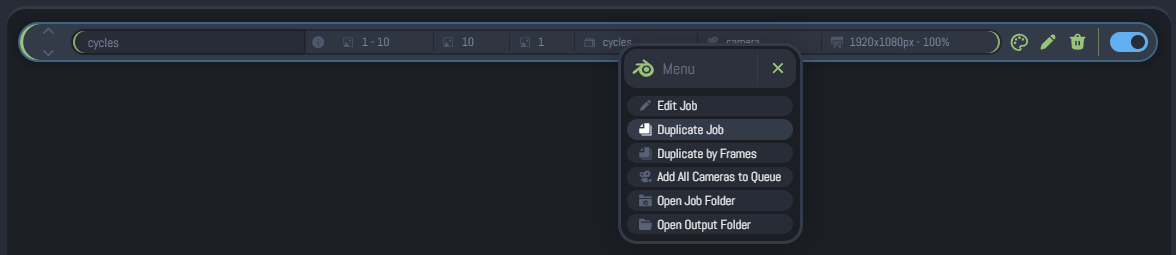
Accessing the Menu
To open the Context Menu:
- Locate the job you wish to manage in the render queue.
- Right-click anywhere on the job item.
Available Actions
The menu dynamically updates based on the current state of the job and your application version.
Edit Job
Allows you to enter the Edit Mode for the selected project. This is the primary way to change render frames, output paths, or camera settings after a job has been added.
This option is hidden if the job is currently Rendering, Paused, or Done. You must stop the render or wait for it to finish to edit its core parameters.
Duplicate Job
Creates an exact clone of the selected job, including all its custom settings (frames, cameras, Python scripts, etc.). The new job is inserted directly below the original one with a unique filename.
This option is available as long as the Global Queue is not actively rendering.
When duplicating a job, ensure you set a different Frame Range or Output Path. This is critical to prevent the new job from accidentally overwriting the existing render files from the original task.
Add All Cameras to Queue
This is a powerful Plus Version feature that automates the creation of a render queue for multi-camera scenes.
- How it works: It scans the
.blendfile and creates a separate job for every camera found in the scene. - Auto-Formatting: It automatically organizes the output paths, appending the camera name to the filenames and folders to prevent overwriting.
- Smart Detection: If only one camera is found, it will notify you instead of duplicating.
This feature is exclusive to Batch Render Creator Plus. It significantly speeds up workflow when rendering multiple viewpoints of the same scene.
Open Job Folder
Instantly opens your operating system's file explorer (Windows Explorer or Linux File Manager) at the location where the source .blend file is stored.
Open Output Folder
Opens the destination folder where the render results (images or videos) are being saved. This is useful for quickly checking the progress of finished frames.
Contextual Visibility
The menu buttons appear or disappear based on the job's Render Status:
| Action | Waiting / None | Rendering | Paused | Done |
|---|---|---|---|---|
| Edit Job | ||||
| Duplicate Job | * | * | ||
| Add All Cameras | ||||
| Open Folder |
*Duplicate Job availability depends on the global queue state, not just the individual job.