Render Time Calculator
The Render Time Calculator is a built-in utility designed to help you estimate the total time required for your rendering projects. It is an essential tool for project planning and cost estimation, allowing you to calculate times for individual jobs or multiple tasks combined.
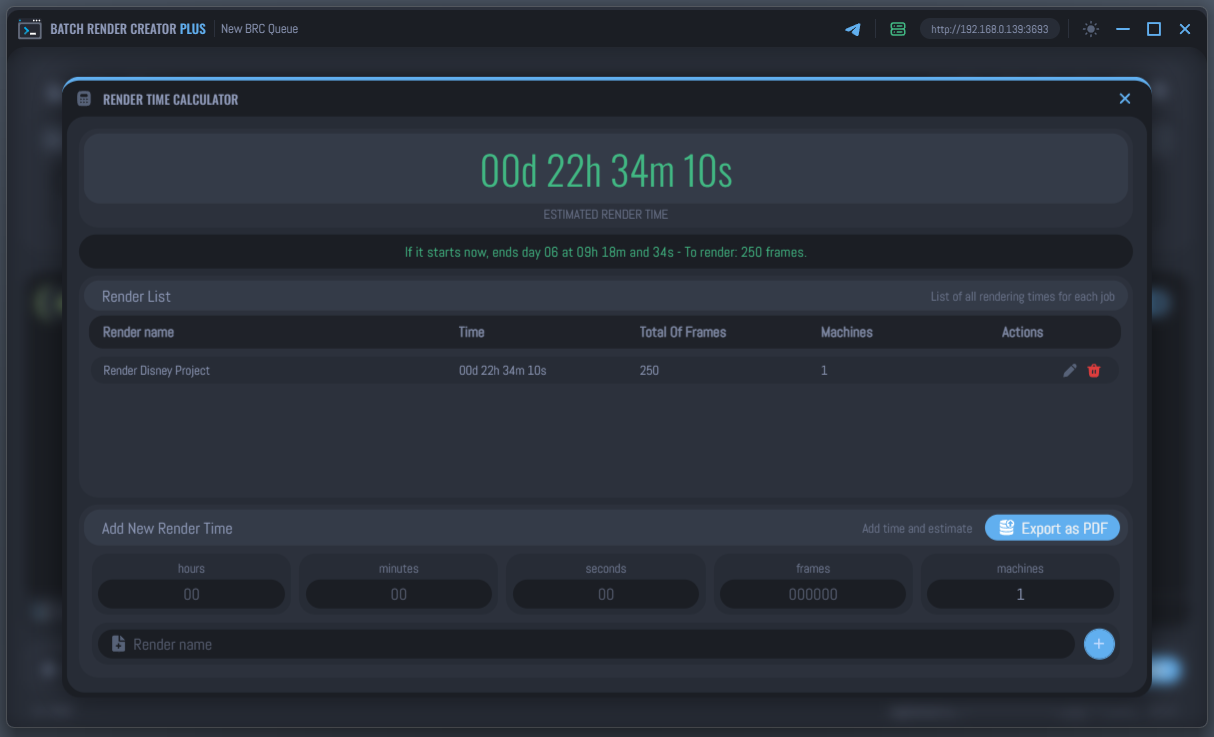
Accessing the Tool
You can open the Render Time Calculator by clicking the Calculator Icon located in the Top Menu at the bottom of the main interface.
How it Works
The tool allows you to build a list of rendering tasks and provides a cumulative time estimate based on your specific hardware setup and job complexity.
1. Define Render Parameters
For each task, you need to provide the following information:
- Per-frame Time: The average time one frame takes to render (Hours, Minutes, Seconds).
- Total Frames: The total number of frames in the sequence or project.
- Machines: The number of computers that will be rendering this specific task simultaneously.
2. Add Jobs to the List
Once you have entered the parameters and given the job a name, click the Add Job button .
- The tool will calculate the estimated duration for that job by dividing the total workload by the number of machines.
- You can add multiple jobs to the list to see the combined total at the top of the window.
3. Estimated Completion
If the list is not empty, the tool provides a real-time estimate of when the render would finish if started right now, including the exact day and time.
Key Features
- Multi-Job Calculation: Add various scenes or projects to get a comprehensive total time for your entire production.
- Machine Scaling: See how adding more machines reduces your total render time instantly, helping you decide if you need a render farm.
- Cost Estimation: By knowing the total time required, you can more accurately estimate electricity costs or external rendering service expenses.
- Edit & Remove: Easily adjust parameters of existing jobs in the list by clicking the Edit icon, or remove them using the Delete icon.
- Export as PDF: Generate a professional report of your render estimates to share with clients or team members.
This tool is purely for estimation and planning. Adding a job here does not add it to the actual BRC render queue; it is meant to help you plan your schedule and costs before you start the real rendering process.