Blender Addon Bridge
The Blender Addon Bridge is a powerful link between your 3D workflow and the Batch Render Creator queue. It allows you to submit render jobs without ever leaving the Blender interface.
Where to find it?
Once installed and enabled, the bridge can be accessed in two primary locations within Blender:
1. Top Render Menu
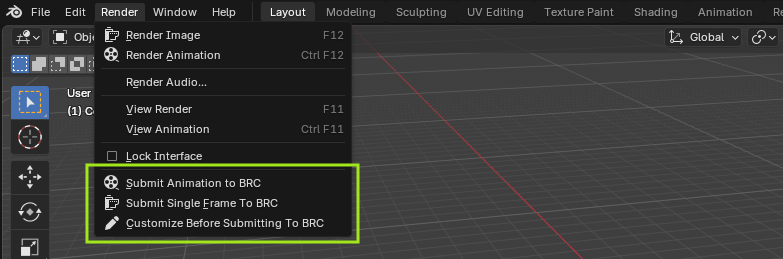
Go to the top header and click Render > Batch Render Creator. This is the quickest way to access the bridge tools.
2. Properties Panel
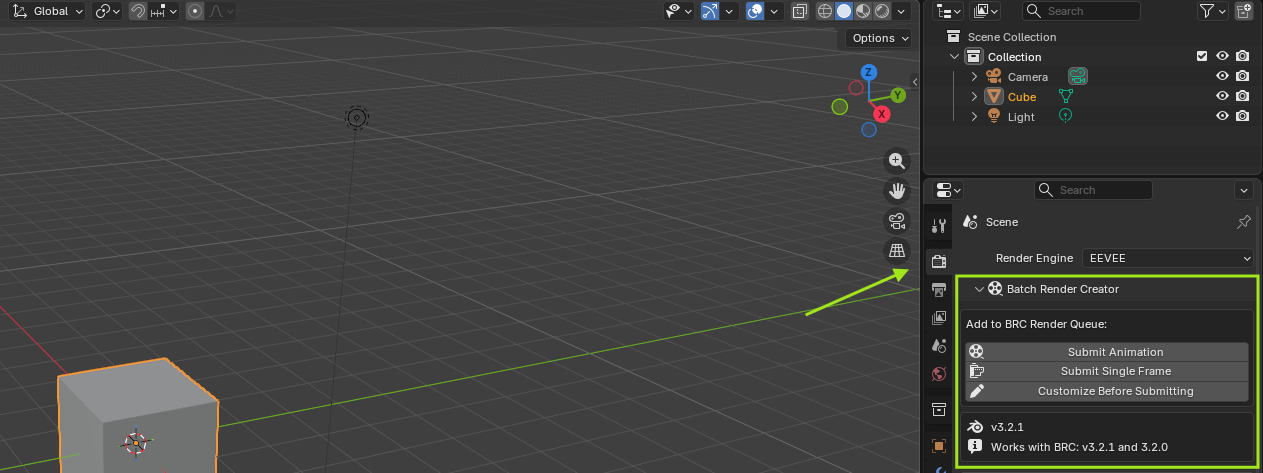
Open the Properties window and navigate to the Render tab (the camera icon). You will find the Batch Render Creator panel here. This view is useful as it shows all the render settings alongside the bridge tools.
Core Functionalities
The bridge provides a specialized set of tools to streamline your rendering workflow. Whether you need a quick one-click submission or a detailed setup, all options are synchronized with your current Blender scene.
Submission Actions
- Submit Animation to BRC: Sends the complete frame range (Start to End) defined in your scene. It captures all current settings like resolution, engine, and output path.
- Submit Single Frame to BRC: Perfect for test renders or still images. It only submits the current frame active in your timeline. The filename is automatically suffixed with the frame number (e.g.,
project_frame_0001). - Customize Before Submitting to BRC: Opens a dedicated modal window where you can override scene settings before they reach the queue. You can change the Project Name, Scene, Camera, Frame Range, Resolution, and even the Render Engine without modifying your actual Blender file.
Temporary Job List
When you submit a job, it appears in a temporary list within the addon. This list acts as a staging area where you can manage your items before they are processed by the main software:
- Refresh List: Synchronizes the list with the local database to ensure everything is up to date.
- / Reorder: Change the priority of jobs by moving them up or down in the list.
- Edit Job: Re-opens the customization modal for an existing job in the list.
- Remove Job: Deletes the job from the temporary list.
IMPORTANT: Automatic Submission & Editing
You can edit or remove jobs from the addon's temporary list as long as they remain in this "pending" state. However, the behavior changes once they are transferred to the BRC Software:
- Auto-Accept Jobs: If the BRC Software is open and the "Auto-Accept Jobs" option is enabled, any job sent from Blender will be captured and added to the official render queue immediately.
- Queue Transfer: Once a job is accepted by the software, it disappears from the Blender Addon's temporary list because it is now being managed by the core engine.
- Post-Transfer Editing: After the transfer, the addon can no longer modify the job. Any further adjustments (changing resolutions, cameras, etc.) must be performed directly within the BRC Software interface.
Always ensure your Blender file is saved before submitting jobs, as the bridge uses the file path to tell BRC which file to render.