Render History
The Render History system in Batch Render Creator v3 provides a comprehensive log of all your previous render sessions. This tool allows you to track productivity, review technical details of past renders, and analyze errors to improve your workflow.
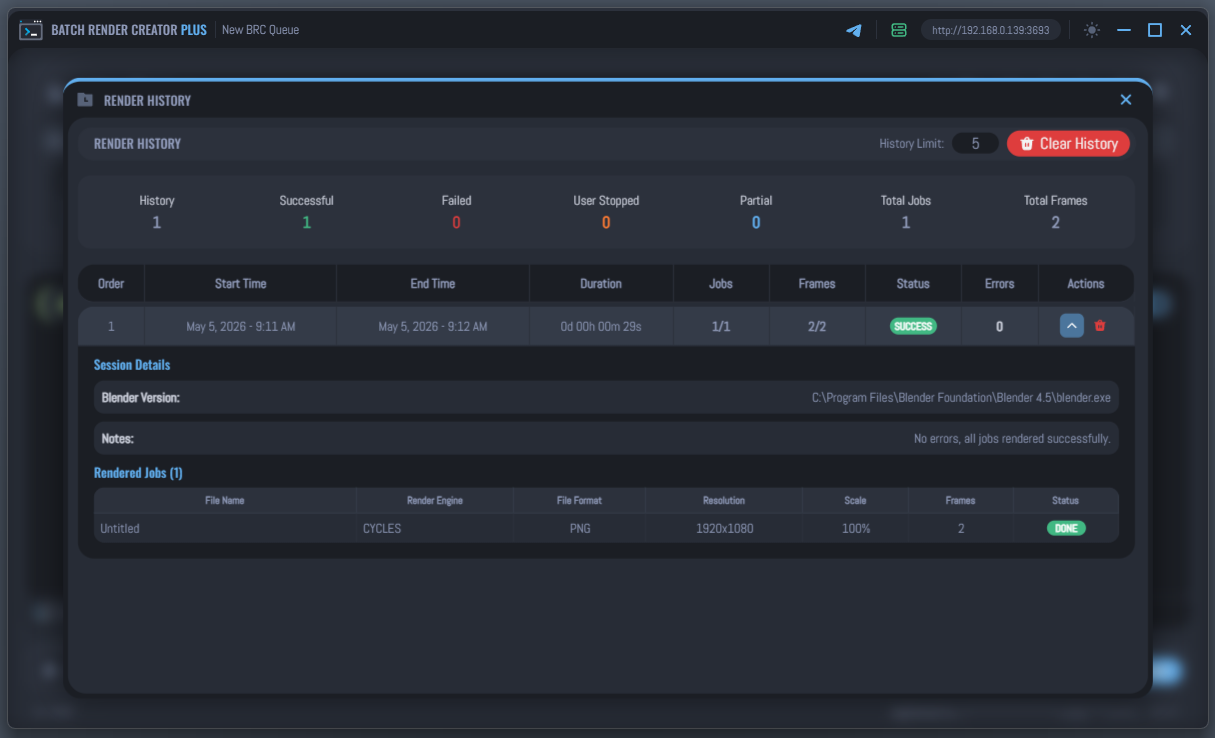
Overview
Render History automatically captures data every time you complete a render queue, whether it finishes successfully or is interrupted by the user or an error.
Statistics Dashboard
At the top of the window, you will find a summary of your rendering history:
- Session Totals: Quick glance at how many sessions were successful, failed, user-stopped, or partially completed.
- Productivity Metrics: Tracking of total jobs and frames rendered across all stored history.
Session Management
History Limit
You can control how many sessions are kept in the log using the History Limit field. Once the limit is reached, the oldest session is automatically removed to make room for new ones.
- Standard Version: Limited to 5 sessions.
- Plus Version: Extends the limit up to 50 sessions.
Clearing Data
- Individual Delete: Click the Delete icon on a specific session row to remove it.
- Clear All: Use the Clear History button to wipe all logs and reset statistics.
Detailed Session Logs
Each session in the list can be expanded by clicking the Chevron icon to reveal in-depth technical information.
1. Session Details
Includes the specific Blender Version used for that session, the path to the project file, and any automated session notes.
2. Rendered Jobs List
A detailed table showing every single file rendered during the session:
- Technical Specs: Render Engine, File Format, Resolution, and Scale.
- Frame Tracking: Total frames rendered for each specific job.
- Status Tracking: Shows if a job was Done, Canceled, or Recovered.
- Tooltips: Hover over any row to see even more metadata, including exact start/end times and camera information.
The Recovered status (indicated by a warning badge) appears when a job encountered errors but was successfully completed after the Blender Auto Recovery performed automated retries.
3. Error Analysis
If a session contains errors, a dedicated section will list the specific error messages captured from the Blender console, grouped by the affected file. This is invaluable for debugging scenes that fail unexpectedly during long render queues.
Render History is saved locally on your machine. If you move your projects to another computer, the history remains bound to the original installation unless you migrate your application database.